
Cutting plotter software free download helps users manage cutting tasks, design alignment, and precision printing with modern machines. Designers and printing professionals rely on advanced software to control devices like the flatbed cutting plotter F13090 and camera auto print cutting plotter systems.
Modern cutting plotter software improves workflow and reduces manual work. It connects your computer with the cutting machine and allows precise control of graphics, shapes, and materials.
Businesses that use plotter machines for stickers, labels, packaging, and vinyl graphics require reliable software to achieve consistent results. With the right program, operators can easily send designs to the machine and control the entire cutting process.
The Skycut ecosystem provides compatible tools and drivers that support high-precision cutting and efficient production.
Understanding Cutting Plotter Software
Cutting plotter software works as the communication bridge between the computer and the cutting machine.
Key Functions of Plotter Software
- Converts design files into machine-readable instructions
- Controls blade movement and cutting depth
- Aligns designs for accurate contour cutting
- Supports multiple graphic formats like AI, SVG, and DXF
- Manages workflow for bulk printing jobs
Professional software also includes alignment features for machines such as the camera auto print cutting plotter, which reads printed marks for accurate cutting.
Flatbed Cutting Plotter F13090 and Software Compatibility
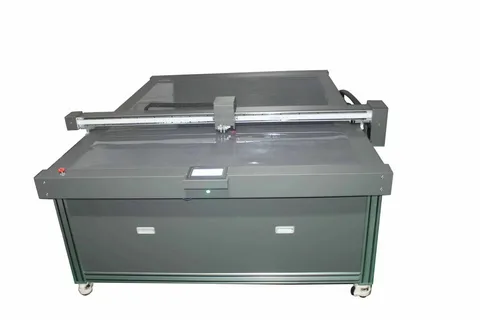
The flatbed cutting plotter F13090 works best with optimized cutting software that supports advanced commands and alignment systems.
Features of the F13090 Flatbed Cutting Plotter
- Large working area for bigger sheets
- Stable flatbed design for rigid materials
- High-speed cutting capability
- Accurate blade control
- Compatibility with various cutting software
This machine handles materials like cardboard, PVC sheets, vinyl, and foam boards. With the right software, users can manage large design layouts and complex shapes.
Why Software Matters for Flatbed Plotters
Flatbed machines require precise commands. Software ensures that the blade moves along exact design paths.
Benefits include:
- Faster production
- Reduced material waste
- Better edge finishing
- Easy job management
Reliable software also improves machine stability and ensures smooth operation during long cutting sessions.
Camera Auto Print Cutting Plotter Technology
A camera auto print cutting plotter includes an optical camera that detects registration marks printed on graphics.
How Camera Cutting Works
The camera scans printed marks on the material. The software then adjusts the cutting path automatically.
This process ensures perfect alignment between printed graphics and cutting lines.
Advantages of Camera-Based Cutting
- Accurate contour cutting
- Faster production workflow
- Reduced manual alignment
- Ideal for stickers and labels
- Perfect results for printed graphics
When combined with reliable cutting plotter software, camera technology provides consistent cutting results.
Benefits of Cutting Plotter Software Free Download
Downloading cutting plotter software gives users essential tools to operate machines efficiently.
Improved Design Control
Software allows full control of cutting paths, blade pressure, and speed.
Users can edit designs before sending them to the machine.
Better Machine Communication
Cutting software ensures proper communication between the computer and machines like the flatbed cutting plotter F13090.
This improves performance and avoids command errors.
Productivity Enhancement
Good software speeds up the entire workflow.
Operators can prepare multiple jobs and run production without delays.
How Skycut Supports Plotter Software and Machines
Skycut develops advanced cutting plotters and compatible software systems for professional printing businesses.
Integrated Software Solutions
Skycut machines support software designed to work smoothly with cutting plotters. These programs provide precise machine control and easy setup.
Reliable Machine Compatibility
Skycut machines like the flatbed cutting plotter F13090 and camera auto print cutting plotter operate efficiently with supported software tools.
Users benefit from stable drivers and reliable system integration.
User-Friendly Interface
Skycut software tools focus on simple navigation. Operators can learn the system quickly without complex setup.
Key advantages include:
- Simple installation process
- Fast design import
- Smooth machine connection
- Accurate cutting commands
These features help printing professionals maintain productivity.
Best Practices for Using Cutting Plotter Software
Proper setup and workflow management improve the performance of cutting machines.
Install the Latest Software Version
Always install updated software to ensure compatibility with your machine.
Optimize Cutting Settings
Adjust blade pressure and speed according to material type.
Correct settings prevent damage to both material and blade.
Use Proper Registration Marks
For machines like the camera auto print cutting plotter, registration marks help the camera align the cutting path.
Maintain Machine Calibration
Regular calibration improves cutting accuracy and reduces alignment errors.
Conclusion
The cutting plotter software free download plays a key role in controlling modern cutting machines and improving workflow efficiency. From managing design files to guiding machines like the flatbed cutting plotter F13090 and camera auto print cutting plotter, reliable software ensures precise cutting and smooth production.
Businesses that use professional plotters benefit greatly from compatible software solutions that improve accuracy and reduce manual work. Skycut offers advanced machines and software support designed for professional cutting environments.
If you want better control, improved productivity, and accurate contour cutting, explore the cutting plotter software free download options available for Skycut machines and upgrade your production workflow today.
FAQs
What is cutting plotter software?
Cutting plotter software controls the cutting machine and converts design files into cutting instructions.
Can I use free cutting plotter software with the F13090?
Yes. Compatible software can operate the flatbed cutting plotter F13090 efficiently when properly installed.
What is a camera auto print cutting plotter?
A camera auto print cutting plotter uses an optical camera to detect registration marks and cut printed graphics accurately.
Why is software important for cutting plotters?
Software ensures correct communication between the computer and the machine, improving accuracy and productivity.
Which machines work with cutting plotter software?
Many machines including flatbed plotters, vinyl cutters, and contour cutting devices work with professional plotter software.